HTTP Status Codes
HTTP 502 Bad Gateway
Bad Gateway — the server received an invalid response from an upstream server
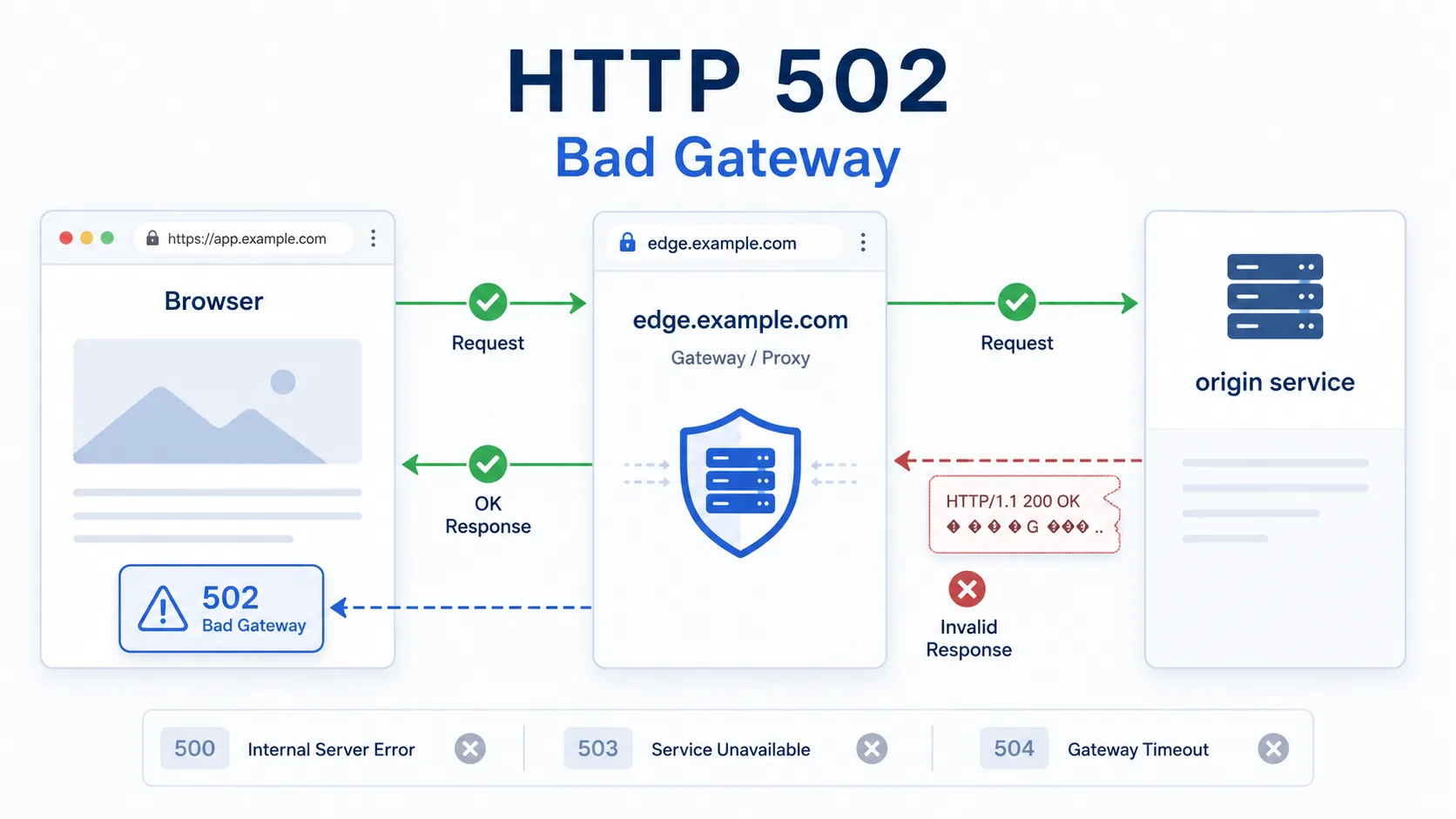
A 502 Bad Gateway response appears in multi-server architectures where one server accepts the client request and then depends on another server behind it. The gateway or proxy is reachable, but the upstream answer it received was invalid, incomplete, or otherwise unusable.
Visual summary
A quick reference view of how HTTP 502 appears when a reachable gateway or proxy cannot use the upstream response it received.
What 502 Means
The shortest useful reading of this status code.
Bad Gateway means the server received an invalid response from an upstream server.
For gateway failures, the key distinction is that one server did answer the client but could not obtain a usable upstream response from another server behind it.
Quick read
Gateway got a bad upstream result
A 502 means an edge, proxy, or gateway server could not use the upstream response it received.
Technical Context
How this status behaves without turning the page into a repair guide.
Gateway hop
A 502 only makes sense when at least two servers are involved in the request path. One server is acting as the public-facing gateway, proxy, or edge layer, and another server behind it is expected to provide the real upstream answer.
Invalid upstream response
Its key contrast is with 500 and 504. A 500 points to an internal application failure on the server handling the request directly, while a 504 points to an upstream timeout where no usable response arrived in time. A 502 sits in the middle: the gateway got something back or reached the next hop, but the result was not a valid response it could present to the client.
Proxy chain
This is why 502s often appear around restarts, deploy windows, proxy misrouting, and unstable backend health rather than around one permanently missing URL.
Related HTTP Codes
Nearby HTTP status codes help clarify how 502 differs inside the same response family.
502
Bad Gateway
the server received an invalid response from an upstream server
500
Internal Server Error
the server hit an unexpected condition while handling the request
503
Service Unavailable
the server is temporarily unable to handle this request
504
Gateway Timeout
the gateway did not receive an upstream response in time
Common Causes
Reverse proxy receives a malformed upstream response
The front server can talk to the backend, but the response it got back is incomplete, invalid, or unusable.
Upstream application closes the connection too early
The gateway begins the handoff, but the backend drops out before finishing a valid HTTP response.
Gateway points to an unhealthy or restarting backend
The proxy route exists, but the next server in the chain is not producing a usable answer yet.
Name resolution or network path to the upstream breaks mid-hop
The failure occurs between cooperating servers rather than between the browser and the first server.
Typical Scenarios
A reverse proxy forwards traffic correctly but the backend crashes before finishing a valid HTTP response
A load balancer reaches a backend that is restarting or marked unhealthy during a deployment window
An edge service can accept the request but cannot complete a clean handoff to the origin service behind it
What To Know
A 502 usually reflects a server-to-server handoff problem rather than a client-side mistake or one missing page. If many pages show 502 at once, the broader pattern usually points to a shared upstream service, proxy route, or deployment event affecting multiple requests at the same time.
Frequently Asked Questions
Common interpretation questions about HTTP 502.
A 500 is an internal failure on the server handling the request. A 502 means a gateway or proxy could not use the response it got from another server behind it.
A 502 means the upstream result was invalid or unusable. A 504 means the upstream did not answer within the allowed time window.
Deployments can briefly route traffic to backends that are restarting, unhealthy, or not yet ready to produce complete responses, which makes gateway layers return 502.