HTTP Status Codes
HTTP 206 Partial Content
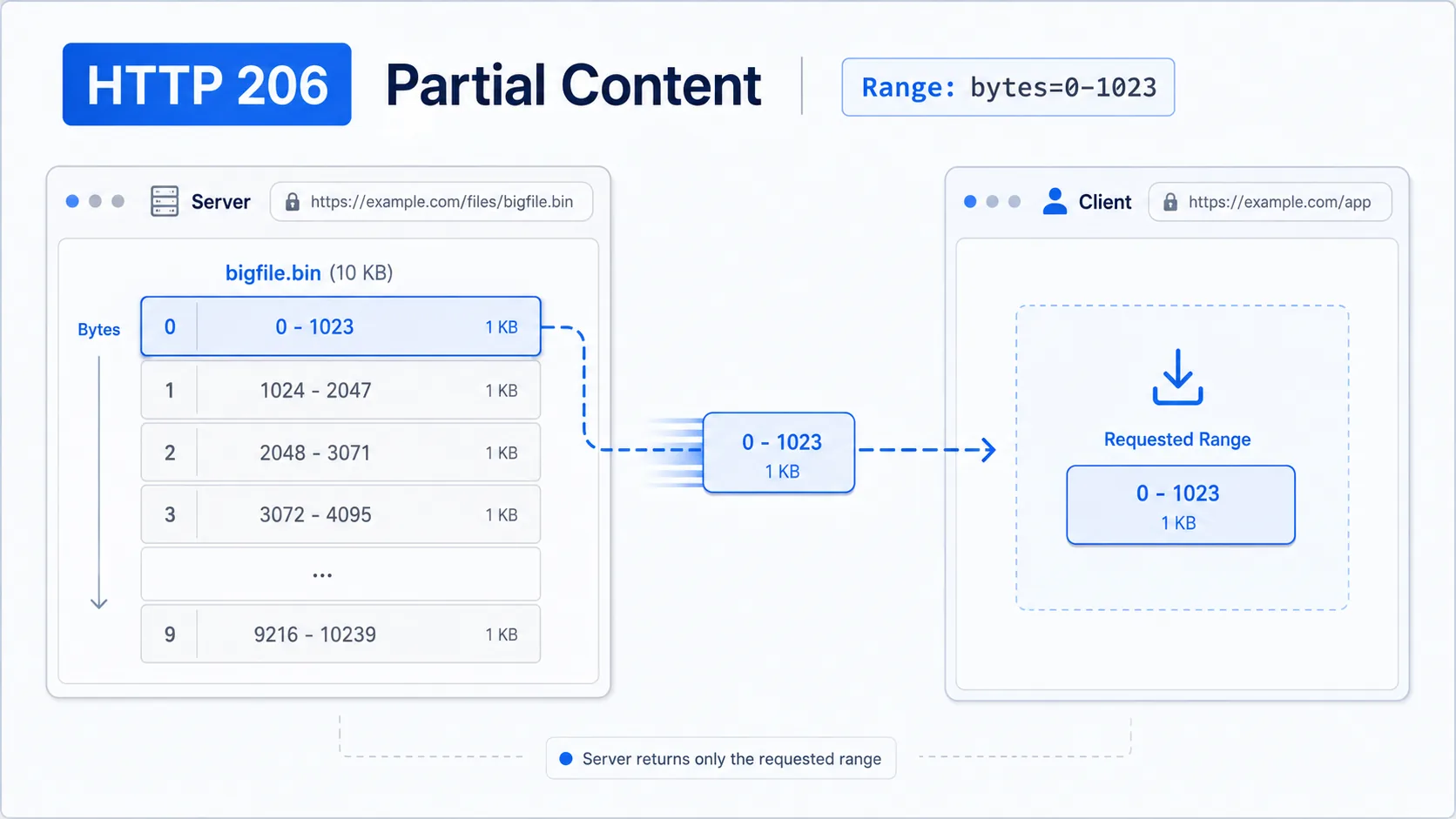
HTTP 206 Partial Content — the server is sending a requested range
HTTP 206 Partial Content is a successful response for a range request. Instead of returning the entire resource like a normal 200 response, the server sends only the byte range or segment that the client requested.
Visual summary
A quick reference view of how HTTP 206 works: A large file segmented into pieces, with only one specific piece being transmitted.
What 206 Means
The shortest useful reading of this status code.
HTTP 206 Partial Content means the server is sending a requested range.
This status falls into the 2xx class, indicating a successful outcome for the request.
Quick read
HTTP 206 Partial Content
the server is sending a requested range
How to fix 206
General informational guidance, not professional advice. Commands can affect your system or data — back up first and proceed at your own risk. FixerCode is an independent reference, not affiliated with any vendor mentioned.
Confirm the range response
Send a small byte-range request and confirm the response uses 206 with a Content-Range header.
curl -I -H "Range: bytes=0-99" https://example.com/fileCompare with a full response
Request the same URL without a Range header. A normal full-body response should usually return 200 instead of 206.
curl -I https://example.com/fileSeparate 206 from an invalid range
If an out-of-bounds range returns 416, the server is distinguishing valid partial delivery from a range it cannot satisfy.
curl -I -H "Range: bytes=999999999-" https://example.com/fileReview client range behavior
For media, downloads, and resumable transfers, 206 is often expected. If it appears unexpectedly, look for client code, proxy behavior, or download tooling that adds a Range header.
Technical Context
How this status behaves without turning the page into a repair guide.
Standard usage
A 206 response is still a success status. The difference from 200 is scope: 200 normally represents the full response body, while 206 represents one requested part of that body.
Technical nuance
The key request signal is a range selection. When the client asks for a byte range and the server can satisfy it, the response uses 206 to show that the payload is intentionally partial rather than incomplete.
Implementation detail
This makes 206 common in media playback, large downloads, file previews, and resumable transfer flows where sending the entire resource at once would be inefficient.
Architecture
The 206 status code requires the server to honor the Range header, splitting the resource into the requested byte range and returning only that portion. This mechanism underpins video streaming platforms that allow seeking, progressive download clients that resume interrupted transfers, and PDF viewers that load pages on demand.
Related HTTP Codes
Nearby HTTP status codes help clarify how 206 differs inside the same response family.
206
HTTP 206 Partial Content
the server is sending a requested range
200
OK
the request succeeded and the server returned the expected response
204
No Content
the request was successful but there is no content to return
416
Range Not Satisfiable
the server cannot fulfill the byte range specified in the request
Common Causes
Client request includes a Range header for only part of a resource
A common condition that triggers a 206 response when the web server evaluates the transaction.
Media playback or file transfer asks for a specific byte segment
A common condition that triggers a 206 response when the web server evaluates the transaction.
Server supports partial representation delivery instead of sending the full body
A common condition that triggers a 206 response when the web server evaluates the transaction.
Typical Scenarios
A video player requests only the next segment needed for playback
A download client resumes from an earlier byte position instead of starting over
A browser or API client asks for a bounded slice of a large file
What To Know
A 206 response should be read as a normal range-based success, not as a failed or truncated response. Its closest comparisons are 200 for full-body success and 416 for a range request the server cannot satisfy.
Frequently Asked Questions
Common interpretation questions about HTTP 206.
This is a normal optimization. Browsers only fetch small parts of the video at a time as you watch it to save data and memory.
206 means the server successfully processed a range request and is returning the requested portion. 416 means the range request was syntactically valid but the requested byte range falls outside the actual file size.
Yes, partial content responses can be cached by intermediaries when proper cache headers are present. The ETag headers on the 206 response allow conditional requests so a client can verify whether its cached partial content is still valid.
Range requests are useful when a client needs only a portion of a large file: video streaming with seeking, resuming interrupted downloads, loading specific pages of a PDF, or fetching chunks of a large API response. If the server does not support ranges, it ignores the Range header and returns the full resource with 200 instead of 206.